
A SKU generator is a free tool that creates standardized product codes based on the attributes you enter. This SKU generator lets you build codes for your entire product catalog, format them with dashes or without, and export everything as a CSV file in seconds. Below the tool, you will find a complete guide to SKU basics, best practices that keep your codes clean across every ecommerce platform, format examples broken down by industry, and a comparison of SKUs and UPCs. You will also learn common mistakes that cause inventory problems and how a well-built SKU system connects directly to faster, more accurate order fulfillment.
| Item Name | Attr 1 | Attr 2 | Attr 3 | SKU |
|---|
Need help fulfilling these SKUs?
ShipBuddies can store your inventory, pick and pack orders, and ship worldwide as your catalog grows.
Get a Custom Fulfillment QuoteTell us your monthly order volume, SKU count, and sales platforms so we can confirm fit.
A SKU (Stock Keeping Unit, pronounced “skew”) is a unique alphanumeric code that a business creates to identify and track a specific product in its inventory. SKUs typically contain 8 to 12 characters that represent attributes like product category, size, color, and style.
Every business designs its own SKU system. That means the same physical product will have a different SKU at every company that sells it. A blue medium t-shirt might be TSH-BLU-M-001 at one store and APPRL-TEE-BLU-MD at another. Neither is wrong. The code just needs to be consistent within your own catalog.
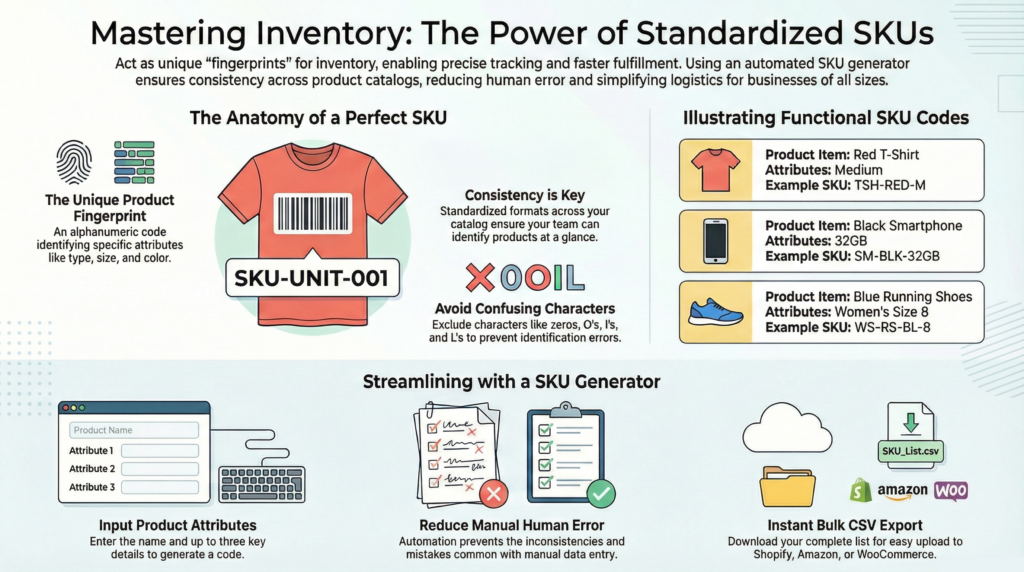
SKUs are not the same as UPCs or barcodes. A UPC is a universal 12-digit number assigned by a standards organization (GS1) that stays the same everywhere. A SKU is your internal shorthand, built around the attributes that matter to your business. This distinction matters when you set up inventory management across multiple sales channels.
Understanding what goes into a good SKU is the first step. The next step is knowing why they matter.
SKUs give every product in your catalog a unique identity. Without them, inventory tracking depends on product names, which are inconsistent, hard to search, and easy to duplicate. SKUs remove that ambiguity.
Accurate inventory tracking. SKUs let you monitor exact stock levels for every product and every variation. When a customer orders a size medium in blue, your system pulls from the right count instead of a general pool. That accuracy prevents overselling and stockouts.
Faster fulfillment. Warehouse teams use SKUs to locate, pick, and pack the correct item on every order. A clear, readable code printed on a bin label or scanned from a barcode reduces picking errors and speeds up processing time.
Better sales analysis. SKUs make it possible to track which specific products and variations sell the most, return the most, and sit on shelves the longest. That data drives smarter purchasing, pricing, and promotional decisions.
Reorder automation. Inventory systems use SKU-level data to trigger automatic reorder alerts when stock drops below a set threshold. Without SKUs, reorder points default to product-level guesses instead of variation-level precision.
Multi-channel consistency. If you sell on Shopify, Amazon, Etsy, and your own website, a single SKU system keeps inventory synced across every channel. One code per product, everywhere.
These benefits depend on how well you build your SKU codes. The practices below keep your system clean from the start.
A good SKU system follows a few rules that prevent problems as your catalog grows.
Keep codes between 8 and 12 characters. Shorter codes lack enough detail to be useful. Longer codes are hard to read on labels, difficult to type manually, and more likely to cause import errors. Eight to twelve characters gives you enough room to include category, product, variant, and a sequence number.
Start with a category or department abbreviation. Leading with a broad grouping (like “ELEC” for electronics or “BTY” for beauty) makes it easy to sort and filter your catalog. It also helps warehouse staff identify the product type at a glance.
Use dashes or underscores as separators. Separators break the code into readable segments. Dashes are the most common choice. Avoid spaces, slashes, or periods, because many ecommerce platforms and CSV imports handle those characters inconsistently.
Never start a SKU with zero. Spreadsheet programs like Excel and Google Sheets automatically strip leading zeros from entries they interpret as numbers. A code like 0421-BLU-SM becomes 421-BLU-SM, which breaks your system. Start with a letter instead.
Avoid special characters. Symbols like #, &, %, or @ can cause encoding problems during CSV imports, API transfers, and URL generation. Stick to letters, numbers, dashes, and underscores.
Be consistent across every product line. Pick a structure and apply it to your entire catalog. If your apparel SKUs follow a Category-Color-Size-Sequence pattern, your home goods should follow the same logic. Inconsistent formats make reporting and filtering unreliable.
The best way to see these rules in action is through real examples.
Different product categories call for different attribute priorities in your SKU structure. The examples below show how the same naming logic adapts to five common ecommerce categories.
Apparel: POLO-BLU-M-001 This code reads as Polo shirt, Blue, Medium, first variation. Apparel SKUs prioritize color and size because those are the attributes that create the most product variations. The sequence number at the end distinguishes between similar items (v-neck vs. crew neck, for example).
Electronics: ELEC-SAMSG-S24-BLK This code reads as Electronics, Samsung, Galaxy S24, Black. Electronics SKUs prioritize brand and model because shoppers search by those attributes. Color or storage size follows as the variant.
Beauty and Skincare: BTY-MOISTR-50ML-LAV This code reads as Beauty, Moisturizer, 50 milliliters, Lavender. Beauty SKUs prioritize product type and size because the same formula often ships in multiple containers. Scent or shade serves as the variant.
Home Goods: HG-CNDL-VAN-8OZ This code reads as Home Goods, Candle, Vanilla, 8 ounces. Home goods SKUs group by item type first, then variant (scent, color, or pattern), then size.
Food and Beverage: BEV-COF-DKRST-12OZ This code reads as Beverage, Coffee, Dark Roast, 12 ounces. Food and beverage SKUs include the flavor or preparation style as a variant because the same product often ships in multiple flavor profiles and package sizes.
Each example follows the same logic: broad category first, then narrowing details, then a size or sequence identifier at the end. That pattern keeps every SKU readable, sortable, and consistent.
These codes are internal. For external identification, products need a different type of code altogether.
SKUs and UPCs serve different purposes in product identification. A SKU is a custom code you design for internal inventory tracking. A UPC (Universal Product Code) is a standardized 12-digit numeric code issued by GS1 that identifies a product across all retailers worldwide.
The key differences between SKUs and UPCs include the following:
Feature | SKU | UPC |
Created by | Individual business | GS1 (standards organization) |
Format | Alphanumeric, 8-12 characters | Numeric only, 12 digits |
Scope | Internal to your business | Universal across all retailers |
Customizable | Yes, you design the format | No, assigned by manufacturer or GS1 |
Purpose | Internal inventory tracking | Point-of-sale scanning, external identification |
Scannable | Can be encoded into barcodes | Always appears as a barcode |
Two other product identifiers are worth knowing. A GTIN (Global Trade Item Number) is the umbrella standard that includes UPCs, EANs (European Article Numbers), and ISBNs. If a marketplace asks for a GTIN, your UPC qualifies.
You can also encode your SKU into a barcode format like Code-128 or a QR code. The SKU text stays the same. The barcode is just a scannable version of it. This is useful for warehouse picking and inventory counts.
The comparison above applies globally, but individual ecommerce platforms add their own rules on top.
Each ecommerce platform handles SKUs differently. Knowing the limits and defaults before you create your codes prevents reformatting later.
Shopify allows up to 16 characters per SKU field. The platform can auto-generate SKUs, but those codes are random strings with no product meaning. Custom SKUs that follow a descriptive format (like POLO-BLU-M-001) give you more control over filtering, reporting, and warehouse operations. Keep your codes under 16 characters to avoid truncation.
Amazon assigns its own identifier, the ASIN (Amazon Standard Identification Number), to every product. But sellers also enter a “Seller SKU” when creating listings. This seller SKU is your internal code. Amazon does not enforce a character limit on seller SKUs, but keeping them under 40 characters is a practical ceiling. For FBA (Fulfillment by Amazon) sellers, the seller SKU prints on warehouse labels, so readability matters.
Etsy does not require SKUs, but the platform supports them. For sellers with multi-variant listings (multiple sizes, colors, or materials on one listing), adding SKUs makes inventory tracking significantly easier. Etsy has no published character limit on SKU fields.
WooCommerce has no built-in character limit for SKUs. The field accepts letters, numbers, dashes, and underscores. Because WooCommerce is self-hosted, your SKU format is entirely up to you. The same best practices apply: 8 to 12 characters, consistent structure, no special characters.
Platform rules only matter if you avoid the formatting mistakes that break SKU systems in the first place.
Most SKU problems come from small formatting decisions that compound as your catalog grows. These are the six most common mistakes and how to prevent them.
Starting a SKU with zero. Excel and Google Sheets treat entries that look like numbers as actual numbers. A SKU like 0421-BLU-SM loses its leading zero and becomes 421-BLU-SM the moment you open the spreadsheet. Format the column as “Text” before pasting your data, or start every SKU with a letter.
Using special characters. Characters like #, &, @, and % cause problems during CSV imports, API data transfers, and URL encoding. A SKU that works in one system may break in another. Stick to letters, numbers, dashes, and underscores.
Reusing a discontinued SKU. Assigning an old SKU to a new product corrupts your historical sales data. Reports that reference that code now mix two different products into one data set. On marketplaces like Amazon, reusing a SKU can also trigger duplicate-listing conflicts. Mark discontinued SKUs as inactive instead.
Making SKUs too long. Codes longer than 15 to 20 characters are hard to read on labels, slow to type manually, and more likely to trigger platform character limits. If your SKU needs more than 12 characters, consider abbreviating attribute values more aggressively.
Using manufacturer codes instead of custom codes. Manufacturer part numbers seem convenient, but they give you no control over structure or consistency. Different manufacturers use different formats. Your internal reports and filters work better with a single, consistent SKU system you designed.
Inconsistent formatting across product lines. If your apparel SKUs use a Color-Size-Sequence structure but your home goods use Size-Color-Type, your reports and filters break. Pick one pattern and apply it across every category.
Avoiding these mistakes keeps your SKU data reliable. The questions below cover the topics sellers ask about most.
What is a SKU? A SKU (Stock Keeping Unit) is a unique alphanumeric code businesses assign to products for inventory tracking. It usually contains 8 to 12 characters that represent attributes like category, size, color, and style. Each business creates its own SKU system, so the same product will have different SKUs at different companies.
What is a SKU generator? A SKU generator is a tool that automatically creates structured product codes based on attributes you enter, like product name, size, and color. It produces consistent, formatted codes you can export as a CSV file and add to your ecommerce platform or inventory system.
How many characters should a SKU be? Most sellers use SKUs between 8 and 12 characters. This range is long enough to include meaningful product details but short enough to scan quickly and fit on labels. If you sell on Shopify, keep SKUs under 16 characters due to platform limits.
What is the difference between a SKU and a UPC? SKUs are custom internal codes created by individual businesses for inventory tracking. UPCs (Universal Product Codes) are standardized 12-digit numeric codes assigned by GS1 that identify products across all retailers. The same product has the same UPC everywhere but will have different SKUs at each company that sells it.
Can I change my SKUs after creating them? Yes, but do it carefully. Changing SKUs after they are in use can disrupt inventory tracking and sales history. If you sell on multiple platforms, update the SKU everywhere at the same time. Finalize a consistent format before you start using your codes.
Should I reuse a SKU for a discontinued product? No. Reusing a SKU corrupts your historical sales data and can create duplicate-SKU conflicts on marketplaces like Amazon. Mark discontinued SKUs as inactive instead of assigning them to new products.
Why does Excel remove the leading zero from my SKU? Excel and Google Sheets treat entries that look like numbers as actual numbers, which strips leading zeros. To prevent this, format the column as “Text” before pasting your SKUs, or start each SKU with a letter instead of a number.
Can I turn my SKUs into barcodes? Yes. Any alphanumeric SKU can be encoded into a barcode format like Code-128 or a QR code using barcode generator software or label printers. The SKU text stays the same. The barcode is just a scannable version of it.
What SKU format works best for Shopify? Shopify allows up to 16 characters per SKU. Use a descriptive format that starts with a category abbreviation, followed by product and variant details. For example: POLO-BLU-M-001 for a blue medium polo shirt. Shopify can auto-generate SKUs, but custom codes give you more control.
Do I need SKUs to sell on Amazon? Amazon assigns its own identifier (ASIN) to every product, but you can also create and assign your own seller SKU when listing products. Custom SKUs are strongly recommended because they let you track inventory and performance using codes that match your internal system, not just Amazon’s.
A consistent SKU system does more than organize your product catalog. It directly improves the speed and accuracy of your order fulfillment process.
When a customer places an order, the fulfillment workflow starts with identifying the exact product, variation, and quantity. Clear, readable SKU codes printed on bin labels and packing slips help warehouse teams locate the right item on the first attempt. That reduces picking errors, which are one of the most common causes of returns and negative reviews.
SKUs also keep inventory counts accurate in real time. Every time an item ships, the system deducts from the correct SKU-level count instead of a general product total. That precision prevents overselling on one channel while stock sits idle on another.
For sellers who work with a third-party logistics provider, a clean SKU system makes onboarding faster and fulfillment more reliable. Your 3PL maps your SKUs to warehouse bin locations, and every pick, pack, and shipment references those codes. The better your SKU structure, the fewer fulfillment errors you experience.
ShipBuddies integrates with your existing SKU system as part of our fulfillment services. If you are looking for more free ecommerce tools to improve your operations, explore our full tool library, including our DIM weight calculator.